A COVID-19 Choropleth Map for Indonesia
Previously I have written about making choropleth maps in Stata, with examples using COVID19 data for Australia and New Zealand. In this post we create another choropleth map, this time with COVID19 data from Indonesia. I have acquired the requisite GIS ESRI shape files for Indonesia from data.humdata.org. The COVID19 data by province was also acquired from data.humdata.org.
I have saved the cases by province data as a Stata dataset. You can click on the link to download the dataset, or load it directly into Stata with the webuse command.
You can download the map files directly from us here: shape file and database file. I have renamed them for ease of use. Alternatively you can download them within Stata with the copy command.
. copy "https://techtips.surveydesign.com.au/mapfiles/indonesia_provinces.shp" "indonesia_provinces.shp"

. copy "https://techtips.surveydesign.com.au/mapfiles/indonesia_provinces.dbf" "indonesia_provinces.dbf"
Now that we have all the files we need, we can begin the process of building our choropleth map. The first step is to build a blank map of Indonesia’s provinces using the shape files. Download the .shp and .dbf files by clicking on the links or using the commands above, and place them in your working directory. If you use the copy command the files will be copied to your current working directory. Then build the shape files with:
. spshape2dta indonesia_provinces
  (importing .shp file)
  (importing .dbf file)
  (creating _ID spatial-unit id)
  (creating _CX coordinate)
  (creating _CY coordinate)

  file indonesia_provinces_shp.dta created
  file indonesia_provinces.dta     created
Note: this will save the two files in your current working directory, not the directory the database and shapefiles are saved in. You can move them, however make sure both files are always together in the same folder.
Let’s test the map. In the command pane:
. use indonesia_provinces.dta

. grmap

Our basemap appears to have imported correctly. To build our choropleth map we now need to load our cases dataset and merge it together with our map dataset. You can download the map dataset using the link above, making sure to place it in your working directory. Alternatively you can use of the webuse commands to load directly into Stata, which I will demonstrate below. I am going to use Stata’s frame and frlink commands to merge the data. In the command pane:
. frame create cases

. webuse set https://techtips.surveydesign.com.au/datasets
(prefix now "https://techtips.surveydesign.com.au/datasets")

. frame cases: webuse covid19-indonesia.dta

. frlink 1:1 ADM1_EN, frame(cases province) generate(link)
(all observations in frame default matched)

. frget cases, from(link)
(1 variable copied from linked frame)

. grmap cases
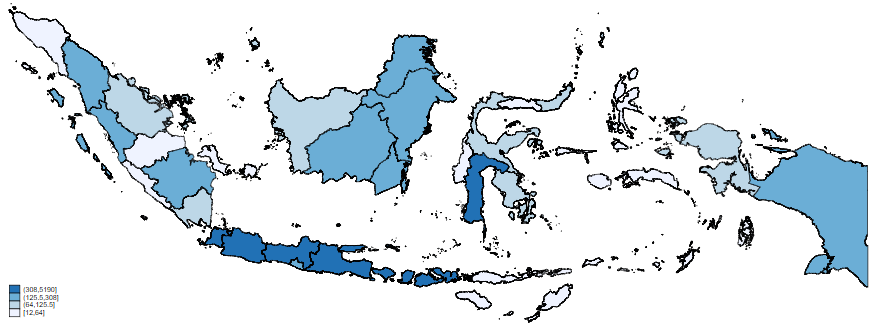
Like the maps of New Zealand and Australia, this map is showing infection count data. It does not take into account the different population sizes of the different districts. Like before, I will now merge province population data from the 2020 Census (previously obtained from Wikipedia). You can download this dataset using the link, however I will again make use of Stata’s webuse commands which are already set to our Tech Tips dataset repository. I will again use frame commands to merge the data and draw a map showing the percentage of population that has contracted the virus. In the command pane:
. frame create pop

. frame pop: webuse indonesian-population-2020.dta

. frlink 1:1 ADM1_EN, frame(pop province) generate(link2)
(all observations in frame default matched)

. frget population, from(link2)
(1 variable copied from linked frame)

. generate casespercent = (cases/population)*100

. grmap casespercent
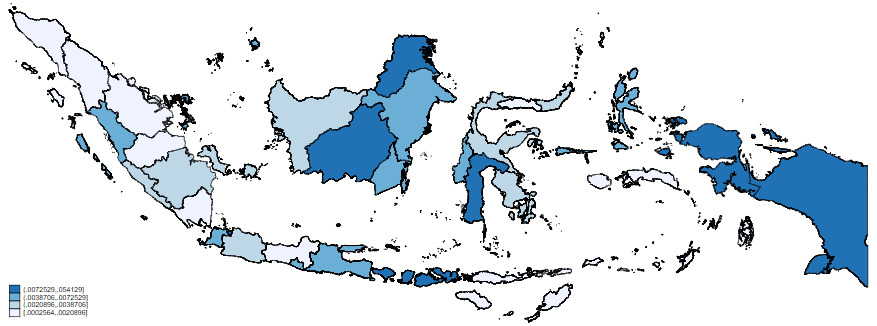
We can see the most obvious changes through the bottom string of land, where the percentage of population infected shows a relatively low number of infections compared to the basic count data. Conversely, the area of land on the right shows a comparatively high percentage of the population infected despite the lower number of cases.