Stacked Bar Charts
Here we have a fictitious product survey dataset, and we want to generate a stacked bar chart. The dataset is part of our Tech Tips dataset repository which is accessible using Stata’s webuse commands. To follow along, you can load the dataset into Stata with the following commands:
. webuse set https://techtips.surveydesign.com.au/datasets
(prefix now "https://techtips.surveydesign.com.au/datasets")

. webuse prodsurvey, clear
This dataset is in long format, with each response being its own observation. This makes modelling the data as a stacked bar chart a little tricky.
. tabulate preference product

                |             product
     preference |    donuts   icecream     kitkat |     Total
----------------+---------------------------------+----------
I dislike a lot |         8          4          5 |        17
      I dislike |        15          7         12 |        34
I am ambivalent |        22         15         18 |        55
         I like |        30         36         40 |       106
   I like a lot |        25         38         25 |        88
----------------+---------------------------------+----------
          Total |       100        100        100 |       300
First, we collapse the data to get counts, this is essentially the same as running a table. We then reshape the data into wide data, a format more suitable for presentation as a graph.
. frame copy default summ

. contract product preference, freq(freq)

. reshape wide freq, i(product) j(preference)
(j = 1 2 3 4 5)

Data                               Long   ->   Wide
-----------------------------------------------------------------------------
Number of observations               15   ->   3
Number of variables                   3   ->   6
j variable (5 values)        preference   ->   (dropped)
xij variables:
                                   freq   ->   freq1 freq2 ... freq5
-----------------------------------------------------------------------------
Finally, we can graph the data, applying labels etc.
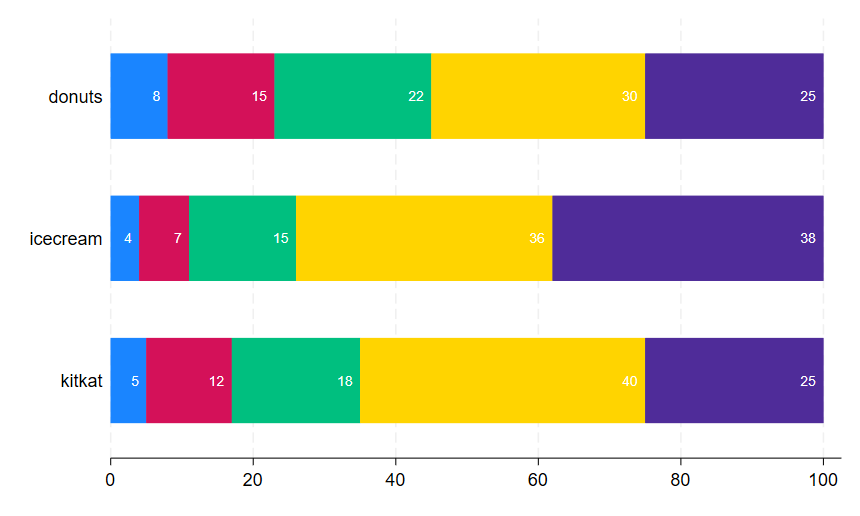
To generate this graph:
. graph hbar (asis) freq*, over(product) stack showyvars
yvaroptions(axis(off)) blabel(bar, size(small) color(white)
position(inside) format(%2.0f)) legend(off)
Ultimately, we can graph anything using Stata, however we must be careful that the data is in the right structures to ensure the graph works.