Creating Word Clouds with Calligram: A User Written Command by Fahad Mirza
Word clouds provide a quick visual summary of the words and phrases used in a collection of text. They are particularly useful when exploring open-ended survey responses, comments, interview material or other qualitative information. Rather than reading hundreds of responses individually to identify recurring words, a word cloud places the most frequently occurring terms together, with more prominent words generally appearing larger.
In this TechTip, we use Calligram, a user-written Stata command developed by Fahad Mirza, to create a word cloud, customise its shape and colours, and save both an interactive HTML version and a publication-ready image. We then apply the same technique to a small set of example survey responses.
Calligram uses a Java engine supplied with the package and works with Stata 17 or later. It does not require a separate Java installation. Unlike an ordinary Stata graph, a Calligram cloud can be explored interactively in a browser, including searching for words and inspecting their counts.
Installing Calligram
Calligram is a community-contributed command available from Fahad Mirza’s GitHub repository. It is not a built-in Stata command.
To install it, enter:
net install calligram, from("https://raw.githubusercontent.com/fahad-mirza/calligram_Stata/main/") replace
Download the accompanying example datasets to your current working directory:
. net get calligram, from("https://raw.githubusercontent.com/fahad-mirza/calligram_Stata/main/")
checking calligram consistency and verifying not already installed...
all files already exist and are up to date.
Check that the command is available and open the help file:
which calligram
help calligram
The replace option allows Stata to replace an earlier installation. The package contains the Java component used to arrange the words. As with any community-contributed command, you should review the source and documentation before using it with confidential or sensitive data.
Preparing the example text
The downloaded sample dataset, cg_inaugural.dta, contains text from United States presidential inaugural addresses. Each observation holds a paragraph, stored in the string variable text.
The following commands open the data and display some examples of the contents.
. use cg_inaugural, clear

. describe text

Variable      Storage   Display    Value
    name         type    format    label      Variable label
----------------------------------------------------------------------------------------------------------------------------------------------------------------------------------------------------------------------------
text            strL    %9s                   one paragraph of the address

. list text in 1/3

     +---------------------------------------------------------------------------------------------------------------------------------------------------------------------------------------------------------------------+
     | text                                                                                                                                                                                                                |
     |---------------------------------------------------------------------------------------------------------------------------------------------------------------------------------------------------------------------|
  1. | Fellow-Citizens of the Senate and of the House of Representatives:                                                                                                                                                  |
  2. | Among the vicissitudes incident to life no event could have filled me with greater anxieties than that of which the notification was transmitted by your order, and received on the 14th day of the present month.. |
  3. | Such being the impressions under which I have, in obedience to the public summons, repaired to the present station, it would be peculiarly improper to omit in this first official act my fervent supplications t.. |
     +---------------------------------------------------------------------------------------------------------------------------------------------------------------------------------------------------------------------+
Calligram works directly with string variables. There is no need to create separate observations for every word. The command handles the word counting and initial text processing.
Creating our first word cloud
The simplest command requires only the name of the text variable:
. calligram, textvar(text)
calligram: 1,216 plural forms merged with the singular (noplurals keeps them apart).
calligram: counted 59,413 words in 1,636 responses (0.09 s); laid out 1 cloud (0.21 s); 10 threads.
calligram: 100 of 100 words placed (largest font 290px).
Word cloud saved to /Users/davidwhite/Documents/Stata/wordCloud/calligram.html
Click the path above, or open the file in any web browser.
Calligram generates a self-contained file called calligram.html. If you specify a file name in the savefile() option the results are written to that file. Open the link shown in Stata’s Results window to explore it in a web browser. You can hover over words to see information about them and interact with the visualisation.
By default, Calligram filters common English words, such as “the” and “and”, that are usually uninformative in a word cloud. It also combines some word forms and displays the most frequent remaining terms.
To produce an illustration for this TechTip, we can create the same basic cloud with explicitly named output files:
. calligram, textvar(text) ///
>     savefile(calligram_basic.html) ///
>     image(calligram_basic.png, replace)
calligram: 100 of 100 words placed (largest font 290px).
calligram: image saved to /Users/davidwhite/Documents/Stata/wordCloud/calligram_basic.png
Word cloud saved to /Users/davidwhite/Documents/Stata/wordCloud/calligram_basic.html
Click the path above, or open the file in any web browser.

Figure 1. A word cloud constructed from the text of US presidential inaugural addresses.
Words shown in larger type occur more frequently in the processed text. However, frequency alone does not tell us whether a word was used favourably or unfavourably.
Customising the appearance
One of Calligram’s more distinctive features is its ability to arrange words inside shapes. The shape() option supports built-in shapes such as a circle, heart, star and diamond.
We can also ask Calligram to identify common two-word phrases, display more terms and choose colours:
. calligram, textvar(text) ///
>     phrases ///
>     shape(heart) ///
>     maxwords(200) ///
>     bgcolor(white) ///
>     gradient(#1d3557 #e63946) ///
>     title("Words from US inaugural addresses") ///
>     savefile(calligram_heart.html) ///
>     image(calligram_heart.png, replace)
calligram: 240 two-word phrases joined: united states (166), fellow citizens (79), federal government (33), general government (25), fellow americans (20), vice president (20), god bless (18), political parties (16), alm
> ighty god (15), chief justice (15), public debt (14), national life (13), executive department (12), public money (12), public expenditures (11), chief magistrate (10), civil war (10), good faith (10), beloved country
> (9), public officers (9), religious liberty (9), lasting peace (8), naval force (8), new era (8), several states (8), ... and 215 more (all of them with saving())
calligram: 191 of 200 words placed (largest font 132px).
  (9 rarely used words did not fit even at minfontsize(8);
   a larger canvas, a roomier shape or a smaller minfontsize() would fit more)
calligram: gradient from #1d3557 to #e63946 (HSL interpolation)
calligram: image saved to /Users/davidwhite/Documents/Stata/wordCloud/calligram_heart.png
Word cloud saved to /Users/davidwhite/Documents/Stata/wordCloud/calligram_heart.html
Click the path above, or open the file in any web browser.
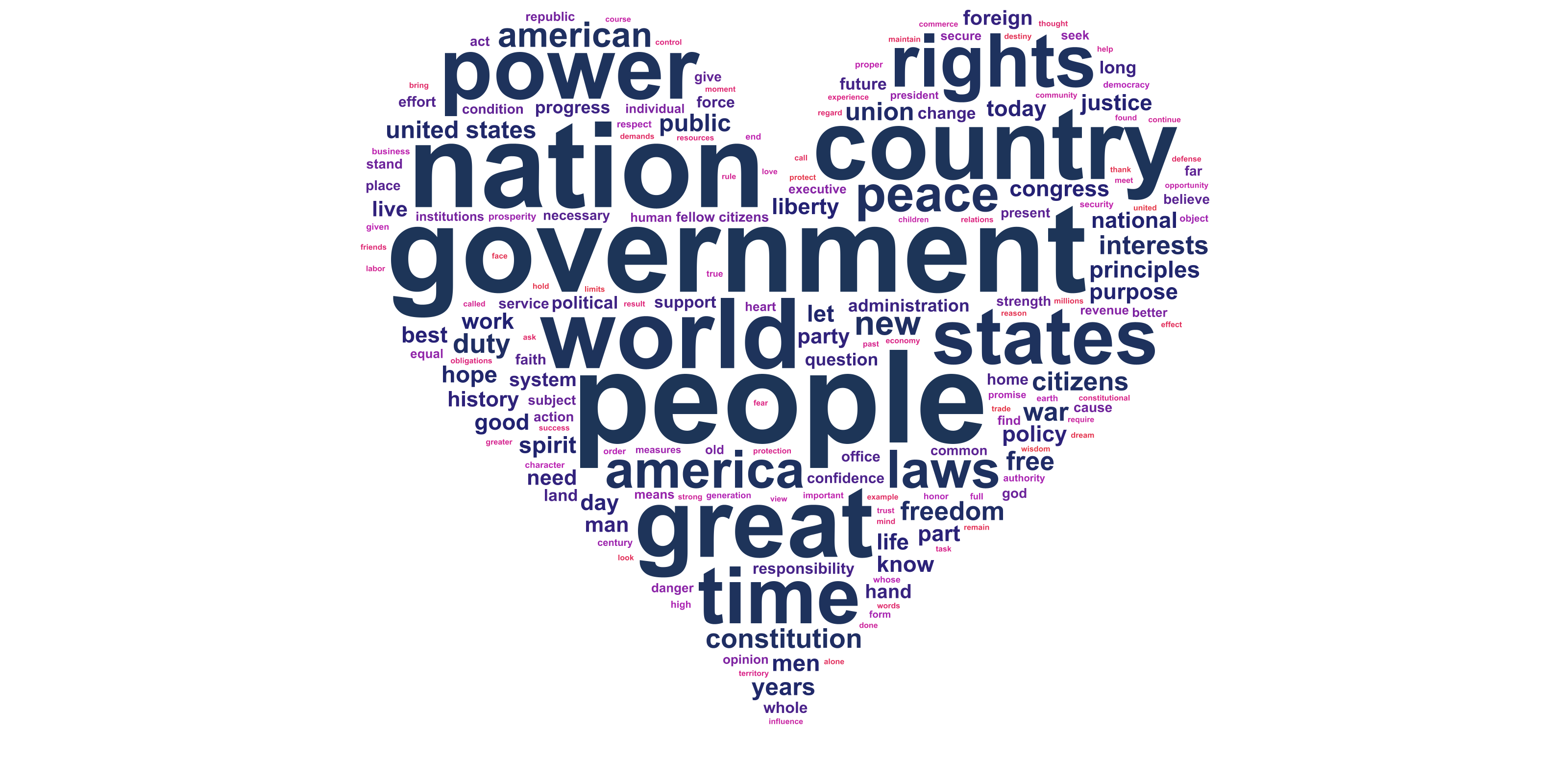
Figure 2. A heart-shaped cloud with a custom colour gradient and detected two-word phrases.
Here is what the principal options do:
| Option | Purpose |
|---|---|
textvar(text) | Identifies the string variable containing the source text. |
phrases | Detects commonly occurring two-word expressions and can display them together. |
shape(heart) | Arranges the words inside a heart shape. |
maxwords(200) | Allows up to 200 words or phrases in the cloud. |
bgcolor(white) | Specifies a white background. |
gradient(#1d3557 #e63946) | Applies a colour gradient from dark blue to red. |
title() | Adds a title to the interactive page. |
savefile() | Names the interactive HTML output file. |
image() | Saves a static image that can be used in a report or webpage. |
The phrases option is particularly useful when two words form a meaningful expression. For example, interpreting united states as a phrase may be more informative than treating united and states independently.
Calligram’s precise layout is determined by the available space and word sizes. Not every word is guaranteed to fit, especially when the shape is narrow or crowded. If important words are omitted, try increasing the width or height of the image, or reducing maxwords().
Applying Calligram to survey responses
Word clouds can also provide a useful first look at open-ended survey questions. Suppose a training course asks participants to describe what they thought of the session.
We will use eight fictional responses to demonstrate the method. The example is small so that the underlying text is easy to inspect.
. clear

. input str100 response

                                                                                                 response
  1. "The training was clear and helpful"
  2. "Excellent examples and helpful explanations"
  3. "The training examples were practical"
  4. "More time for practical exercises would help"
  5. "Excellent presentation and clear explanations"
  6. "The examples were useful and relevant"
  7. "Helpful training with practical examples"
  8. "More exercises and examples please"
  9. end

.
. calligram, textvar(response) ///
>     minfreq(1) ///
>     shape(circle) ///
>     bgcolor(white) ///
>     title("Feedback from training participants") ///
>     savefile(calligram_feedback.html) ///
>     image(calligram_feedback.png, replace)
calligram: 14 of 14 words placed (largest font 153px).
calligram: image saved to /Users/davidwhite/Documents/Stata/wordCloud/calligram_feedback.png
Word cloud saved to /Users/davidwhite/Documents/Stata/wordCloud/calligram_feedback.html
Click the path above, or open the file in any web browser.
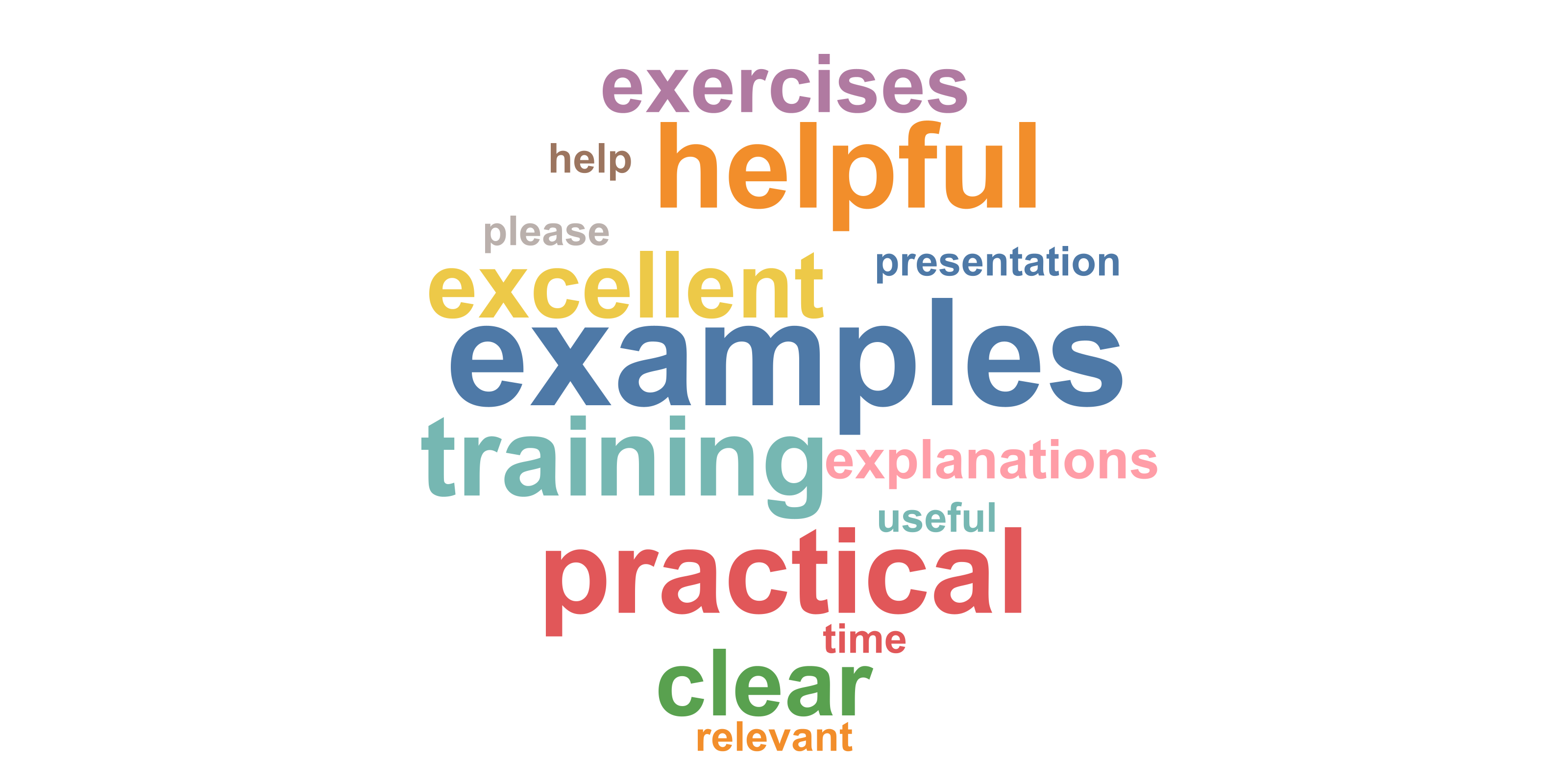
Figure 3. A circular word cloud based on eight fictional training-course responses.
Because the sample is small, we specify minfreq(1) to include words that appear only once. With a large survey, a higher minimum frequency may make the cloud easier to read.
In your own data, replace response with the name of the string variable holding the answers. You can also use Stata’s if qualifier to examine selected respondents rather than the whole sample.
Interpreting the results carefully
A word cloud is an exploratory visualisation, not an analysis of sentiment or a measure of statistical significance. It can suggest topics that occur frequently but cannot explain why people used those words.
For instance, the word training might be common in our fictional responses, but its size does not indicate whether people liked the training. Similarly, the presence of time could refer to needing more time or to the timing of a session. Reading the source comments remains essential.
Three decisions can substantially affect the cloud:
- Stopwords: removing commonplace words makes substantive terms more visible, but the choices may not be appropriate for every topic or language.
- Minimum frequency: a higher threshold reduces visual clutter but may hide unusual and important responses.
- Phrases and word forms: combining related words can improve readability, but it can also change which terms appear most prominently.
For formal reporting, consider using a word cloud alongside a frequency table or a more systematic coding of open-ended responses.
Exporting and checking the files
The savefile() option creates an interactive HTML document, while image() creates a static graphic such as a PNG. These serve different purposes: the interactive file is useful for exploration, and the image is convenient for reports, presentations or a TechTip webpage.
After running the examples, you can check that Calligram has produced its outputs:
. confirm file calligram_basic.png

. confirm file calligram_heart.png

. confirm file calligram_feedback.png

. confirm file calligram_heart.html
Calligram also stores information in r(). Immediately after running a Calligram command, you can inspect these results:
. calligram, textvar(response) ///
>     savefile(calligram_response.html) ///
>     image(calligram_basic.png, replace)
calligram: 8 of 8 words placed (largest font 307px).
calligram: image saved to /Users/davidwhite/Documents/Stata/wordCloud/calligram_basic.png
Word cloud saved to /Users/davidwhite/Documents/Stata/wordCloud/calligram_response.html
Click the path above, or open the file in any web browser.

. return list

scalars:
            r(toolbar) =  1
            r(outline) =  0
             r(online) =  0
          r(N_phrases) =  0
              r(N_obs) =  8
               r(java) =  1
        r(maxfontsize) =  307
           r(N_placed) =  8
            r(N_words) =  8

macros:
           r(savefile) : "/Users/davidwhite/Documents/Stata/wordCloud/calligram_response.html"
              r(shape) : "rectangle"
              r(image) : " `"/Users/davidwhite/Documents/Stata/wordCloud/calligram_basic.png"'"
The result r(java) indicates whether the Java layout engine was used (1 means it ran). If Java is unavailable, Calligram can fall back to a more limited Mata-based layout; the shape options may not behave as expected. The GitHub documentation provides troubleshooting advice.
Further possibilities
We have used Calligram only for a simple word cloud, a shaped cloud and a set of survey responses. The command can also colour words according to a variable, compare groups of responses, work with other languages and arrange words within geographic shapes.
For more examples, see Fahad Mirza’s interactive Calligram gallery and enter help calligram in Stata.
In summary: Calligram makes it possible to turn text held in Stata into attractive, interactive word clouds without manually counting words or using separate graphics software. The examples above provide a starting point for exploring open-ended survey answers and communicating recurring themes, while preserving the need to examine the original text before drawing conclusions.
Acknowledgement: Calligram is a user-written Stata command developed by Fahad Mirza. SDAS is not the author or maintainer of the command. The inaugural-address example dataset is supplied with the Calligram package.